D82|LABS
Subscribe Engage

D82LABS / PRODUCTS / SCOPELEDGER

The bid was the promise. The job is the truth.

ScopeLedger is a job-economics workbook for small contractors. It connects your estimate, your change orders, your actual costs, and your payments into one number that matters: the forecast final cost of every job — plus an honest count of the work you've performed or promised that nobody has approved yet. That number, not the bid, is the truth.

Status
Live · v1 · 2026-09-26
Format
Excel 2021+/365 · Google Sheets · no macros
Built for
Owner-operators & small GCs (1–10 crew)

One-time · 30-day refund, no interrogation · one purchase = one business

The Problem

Margin doesn't die in the bid. It dies in the drift.

Fixed-price jobs rarely fail all at once. They leak: a verbal "go ahead" that never gets signed, a pending change order everyone forgets, materials that ran over while the invoice still says the original number. By the time the final accounting arrives, the job is over and so is the money.

The three leaks

  • Unapproved change orders. Work performed or promised without a signature. It costs real money to perform and may never be billed. Most trackers count it as revenue. ScopeLedger counts it as exposure.
  • Cost drift. Actuals creep while the budget you mentally compare against is still the bid. ScopeLedger compares actuals + remaining cost against the revised budget, every week.
  • Billing ≠ cash. Invoiced, collected, and outstanding live in separate memories. One payments ledger, one balance.

Why existing spreadsheets don't fix it

  • Most contractor spreadsheets are raw trackers — they record what happened. Nothing surfaces what is about to happen to your margin.
  • Formula-fragile: one deleted row and the totals lie silently.
  • No decision layer: no signal that tells you which job needs a phone call today.
  • ScopeLedger is built the other way around: the signal is the product, the tracking is the input.

The Product

Ten sheets. One habit: Friday, ten minutes.

Enter estimates once, log change orders the day they happen, book actuals and payments weekly. Everything downstream computes itself. Screenshots below are the actual product — fictional demo data included so you can see the signal ladder before you touch your own jobs.

What's inside

  • START HERE — the five-step workflow and the one rule.
  • SETUP — business defaults, alarm thresholds you control, the 8 cost categories used everywhere else.
  • JOBS + ESTIMATE — project register and scope lines; contract value feeds itself.
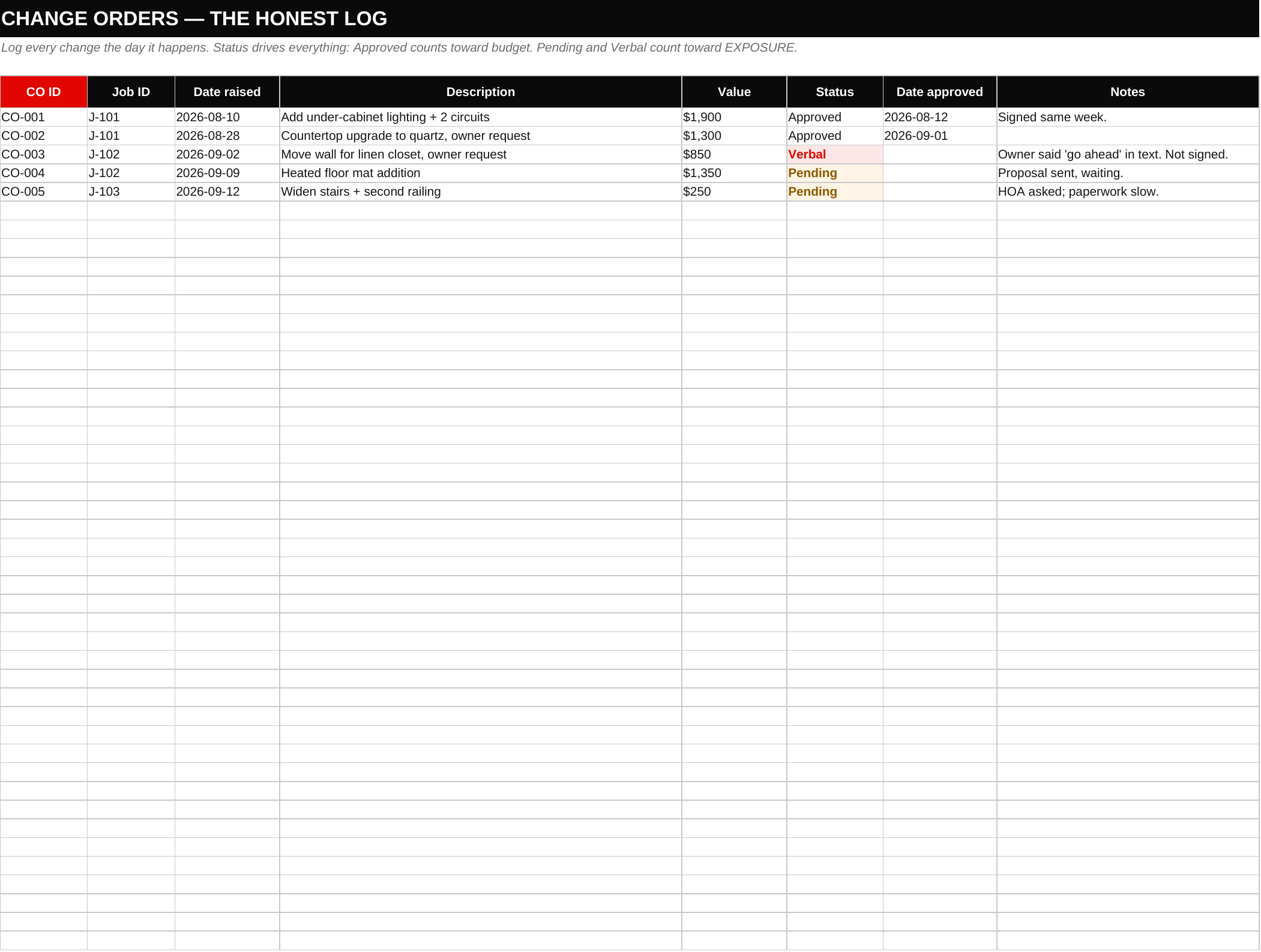
  • CHANGE ORDERS — the honest log. Approved / Pending / Verbal. Verbal shows red on purpose.
  • ACTUAL COSTS + PAYMENTS — weekly entries, same categories, invoiced vs collected.
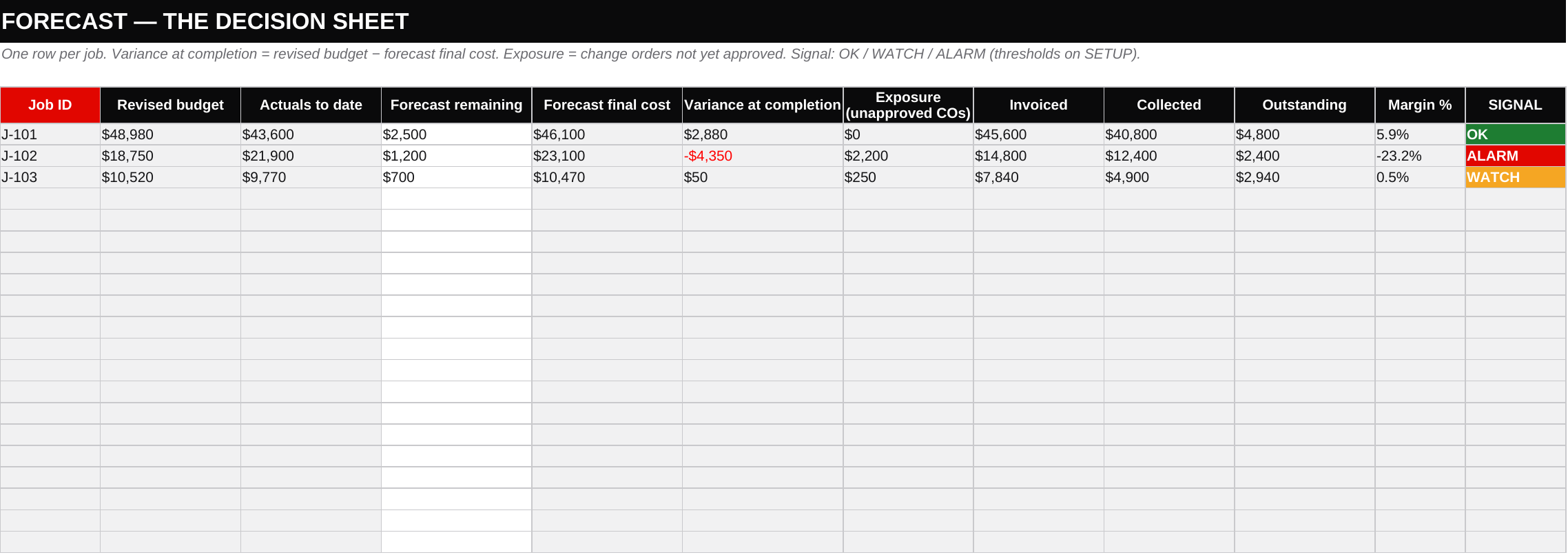
  • FORECAST — the decision sheet: revised budget, actuals, remaining, forecast final cost, variance, exposure, margin, signal.
  • DASHBOARD — portfolio truth: totals, weighted margin, exposure, ALARM count, highest-exposure job.
  • REFERENCE — glossary, a worked example of a verbal CO becoming an alarm, FAQ.

The signal ladder

  • OK — variance is healthy and no unapproved work is open. Leave it alone.
  • WATCH — margin is thin or exposure exists. Get the signature this week.
  • ALARM — the job will lose money at current pace, or exposure has crossed your threshold. Stop-work conversation, today, while it's still cheap to fix.

Thresholds are yours: alarm exposure % and watch variance % live on SETUP, not in our code.
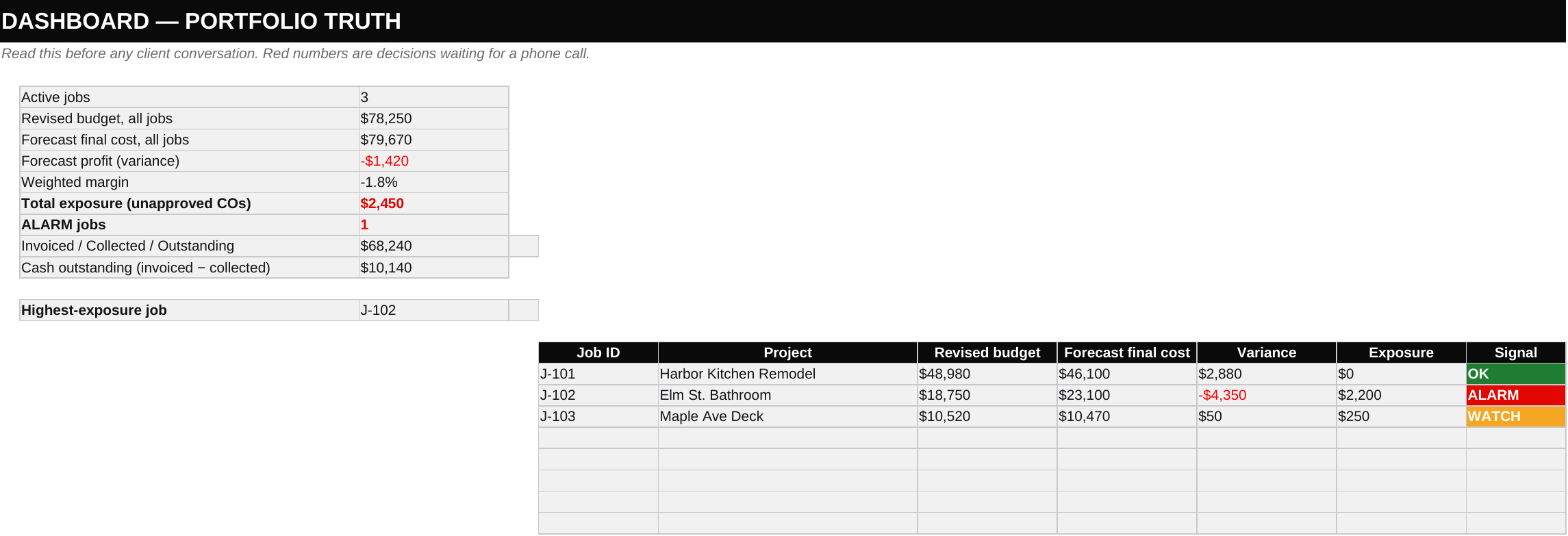
ScopeLedger dashboard sheet showing portfolio totals, forecast profit, total exposure, and a per-job table with OK, ALARM, and WATCH signal badges
The dashboard. Demo portfolio is deliberately under water — the ALARM job is a bathroom where a verbal CO and cost drift erased the margin.
ScopeLedger forecast sheet with revised budget, actuals, forecast final cost, variance, exposure, margin percent and signal column per job
FORECAST — the decision sheet. White cells are yours; gray cells are formulas; the red column wants your judgment.
ScopeLedger change order log with Approved, Pending, and Verbal statuses, Verbal rows highlighted red
The honest log. A verbal approval is not revenue. It is exposure, and it is colored like it.

Honest Comparison

Why not just ask a general AI, or grab a free template?

A general AI chat can explain job costing. It cannot hand you a connected, working workbook: twenty jobs with portfolio rollups, dropdown-driven categories, conditional alarm colors that survive Friday's entries, and a dashboard that updates because the formulas — not a model — recompute. Free templates usually track and stop; none of the ones we studied surfaces unapproved-change exposure against forecast final cost. ScopeLedger's structure, signal logic, and worked example are original D82Labs work. The file is the artifact; the judgment stays yours.

FAQ

Asked before purchase.

Compatibility

  • Excel: 2021 and Microsoft 365, Windows and Mac. No macros, no add-ins, no external links.
  • Google Sheets: File → Import → Replace spreadsheet. All formulas are Sheets-compatible; recreate the status dropdowns if they drop on import (REFERENCE sheet explains how).
  • Excel 2019: should work, untested by D82Labs.

Capacity

  • 20 jobs with spare pre-formatted rows on every transaction sheet. Adding rows means copying formulas down — nothing breaks.
  • Fictional demo data is included and marked; delete it, keep a clean backup, enter your own jobs.

Buying

  • $39 one-time. Delivered via Gumroad as a single .xlsx — one excellent artifact, no filler bundle.
  • 30-day refund, no interrogation: crabrat@d82labs.com.
  • License: one purchase = one business. Don't redistribute the file.
  • Defect reports are fixed in the next patch release, free to existing buyers.

Limits, stated

  • It will not invoice your clients, run payroll, or file taxes. It tells you which job needs your judgment today.
  • The forecast remaining cost is your number to keep honest. The workbook makes evasion visible; it cannot make it impossible.

Evidence & Support

Where this came from.

Field Notes

The market finding behind ScopeLedger

Why contractor job costing, why change-order exposure, and what we found scanning what small contractors already buy and complain about. Published on the D82Labs Substack.

Support

Questions, refunds, issues

One inbox, read by the node that built the workbook. Refund requests honored for 30 days, no questions asked.